Home / Free tools / Before and after photo maker
Before and after photo maker
Drop the before photo and the after photo, pick a layout and a size, and download one image ready for Instagram, TikTok or a listing. Free, no sign-up, and nothing is uploaded: the image is put together in your browser.
Add both photos to enable the download.
Next step: stage the room
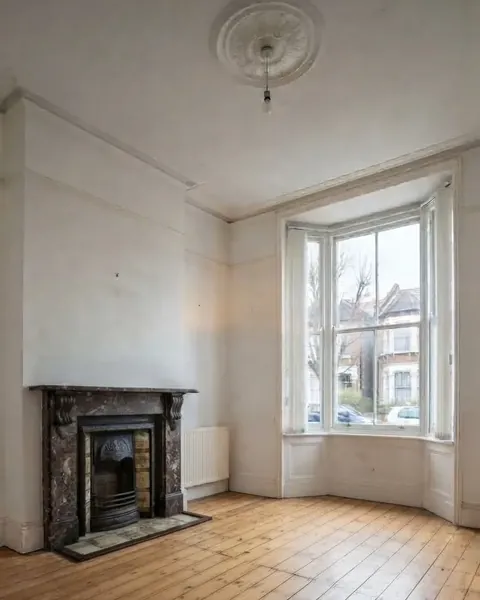
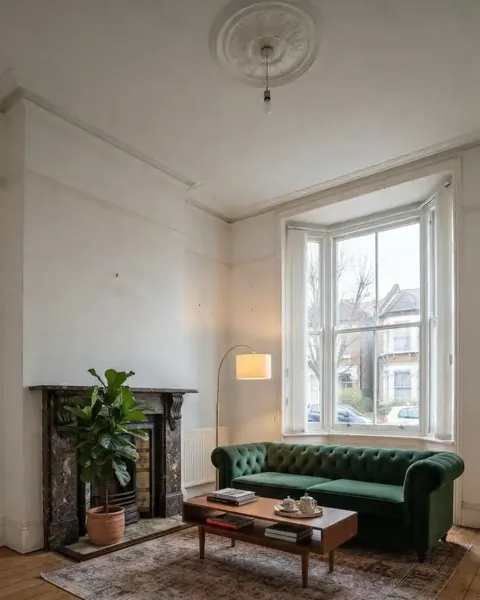
Photos ready? If a room is empty, Roomstill furnishes it without moving a wall, window or door, and gives you the pair a portal asks for: the room as it is, and the staged render.
Stage an empty room One watermarked render a day is free, no account and no card.
Which layout for which post
Side by side reads at a glance in a square or on a listing: the eye compares left and right without scrolling. Top and bottom is made for a 9:16 story or reel: each photo gets the full width, so a landscape shot loses little. Slider and Diagonal lay both photos over the whole frame and cut between them, so the room lines up across the cut. They only work when both photos were taken from the same spot.
With the slider layout you can also download a five-second video in which the line sweeps from the before to the after and settles in the middle. It is recorded in your browser: MP4 in Chrome, Edge and Safari, WebM in Firefox.
Sizes, to the pixel
Three sizes, each exported at exactly its pixel count: 1080 x 1350 (4:5 portrait, the Instagram feed), 1080 x 1080 (square) and 1080 x 1920 (9:16, TikTok, Reels and Stories). Each photo is cropped to fill its part of the frame, never stretched: a stretched room has leaning walls, and people notice. The image is saved as a JPEG at 92% quality.
Take the two photos the same way
- Stand in the same spot. Mark it on the floor with tape if the work takes weeks.
- Keep the same lens. The iPhone’s 0.5x and 1x give two different rooms; the ultra-wide also bends straight lines near the edges.
- Hold the phone at the same height and level, ideally chest height.
- Shoot at the same time of day, lights in the same state.
Get those four right and the slider layout lines up almost by itself. Get them wrong and side by side still works: it forgives a different framing.
The small roomstill.com credit
By default a small “roomstill.com” sits in the bottom corner of the image. It is how people who see your post can find the tool, and it is the only thing we ask in return. Untick it and it is gone: there is no other watermark, and the tool stays free either way.
If the after photo is virtually staged rather than real work, say so. Rightmove and several MLSs require an AI or “virtually staged” label and the original photo; our free labelling tool adds the disclosure in six languages, and our guide to Rightmove photo requirements quotes the rule.
Questions people ask
Is this before and after photo maker free?
Yes. No sign-up, no limit, no payment. The image is put together on your device, so it costs us nothing to run, which is why it can stay free.
Is there a watermark on the result?
Only a small roomstill.com credit in the bottom corner, and you can untick it before downloading. There is no other mark on the image.
Are my photos uploaded?
No. Both photos are read and combined inside your browser and never leave your device. Close the tab and nothing remains anywhere.
What size is a before and after post for Instagram and TikTok?
For the Instagram feed, 1080 x 1350 pixels (4:5 portrait) or 1080 x 1080 (square). For TikTok, Reels and Stories, 1080 x 1920 (9:16). The tool exports exactly those sizes.
Can I make a before and after video or GIF?
A video, yes: choose the slider layout and download a five-second clip of the line sweeping across, as MP4 in Chrome, Edge and Safari or WebM in Firefox. No GIF: a GIF is limited to 256 colours, which bands a photo, and weighs far more than the same clip in MP4.
Can I use it for a property listing?
Yes. If the after photo is virtually staged, label it: Rightmove and several MLSs require a disclosure and the original photo. Keep the credit off for a portal, which may not accept text in images.
Does it work with iPhone HEIC photos?
Yes. HEIC photos are decoded in your browser and combined like any other photo.